Speak the work.
Keep the flow.
You think faster than you type. Speak naturally, shape the words by voice, and ask about what’s on your screen without breaking focus.
Options, tradeoffs, risks, recommendation, and next steps — organized into a reviewable draft.
Say the context you would never bother to type.
AI gets better input when you can explain the full thought: goals, background, constraints, examples, corrections, and follow-up questions. Loqua lets that conversation stay natural.
Explore an idea without breaking the thought to type it.
Talk through a reading, assignment, or research question, add what you already know, then keep asking follow-ups while the idea is still moving.
“Compare these two arguments, explain where they disagree, and give me three questions I should investigate before I write.”
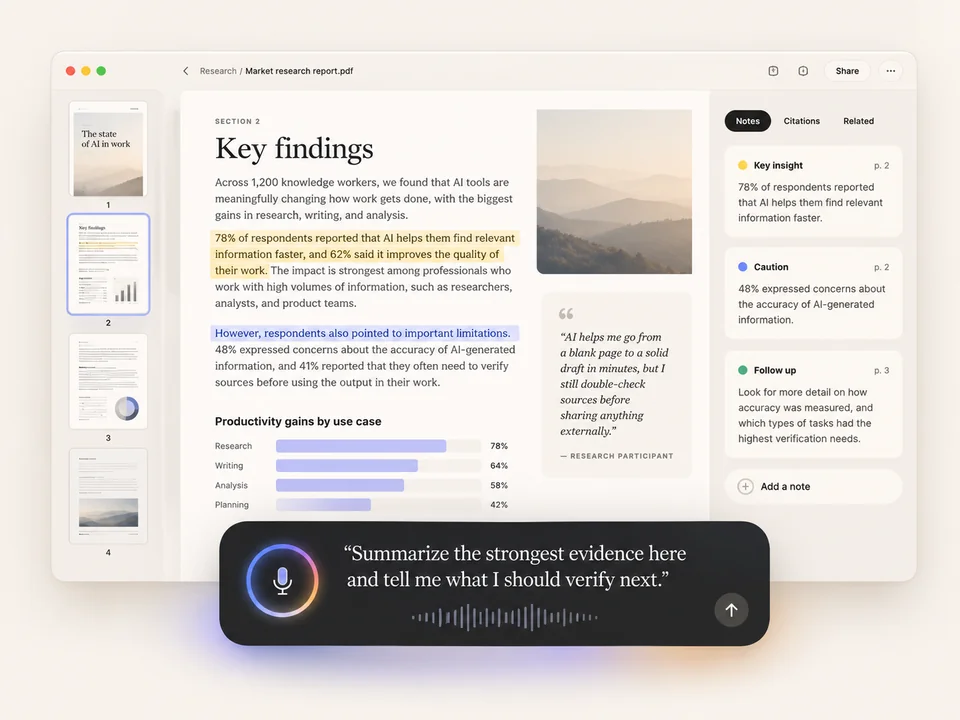
If it’s on your screen, ask about it.
Select the part you care about. Ask out loud. Keep going.

Get the rough version out. Fix it by voice.
Drafting and editing do not need to be separate modes. Speak the first version, select what needs work, and tell Loqua how to change it — shorter, clearer, more direct, translated, or restructured.
• Two key issues remain unresolved.
• The team needs one more review cycle before launch.
Capture the thought before it disappears.
That useful thought won’t wait for you to open a notes app. Say it now. Turn it into next steps while it’s still fresh.
• Revised screenshots — Design — Thu
• Copy check — Maya
• Confirm tracking event names — Me — before engineering handoff
From thought to done, with fewer switches.
One thought leads to the next. Dictate it, refine it, bring in context, and keep the momentum.
Find the moment where voice clicks.
Real moments from writing, editing, asking, and creating. Pick a workflow to see what your next five minutes could feel like.
Less busywork between you and the good work.
These are not separate feature islands. They protect your attention when reading, asking, listening, or handling a small desktop task would otherwise split your focus and slow the work.
Listen when reading is the slower mode.
Hear selected text or longer material when listening helps you stay with the work instead of bouncing back and forth across dense text.
A question in mind? Ask it out loud.
Open Ask Anything with the shortcut, ask out loud, and keep following up without jumping to a search engine, browser tab, or separate AI chat window. The goal is not just speed — it is protecting your attention.
Skip a small desktop detour.
Use supported Mac voice actions to handle small tasks such as screenshots, Wi‑Fi, Bluetooth or opening apps without losing your place or scattering your attention.
Your keyboard isn’t going away.
You’ll just need it less.
Start with voice input. Bring in screen context when it matters. Shape the result by voice. Then keep moving without breaking the flow.
Download Loqua ↗